ENGIFINANCE · FOR SMEs

Treasury management and bank reconciliation for SMEs.

EngiFinance is an online treasury management application for SMEs. It imports the company's bank statements and documents, categorises and reconciles the transactions, shows the cash flow and what is still to be collected, and prepares the monthly export for the accountant.

  • ✔Statements from several banks and accounts, imported by file, with no access to the bank accounts
  • ✔Invoices read through the Portuguese tax authority's QR code and, on documents without a QR code, by artificial intelligence
  • ✔Automatic reconciliation when the match is unambiguous, and suggestions in the remaining cases
  • ✔Monthly cash flow and export of the month for the accountant
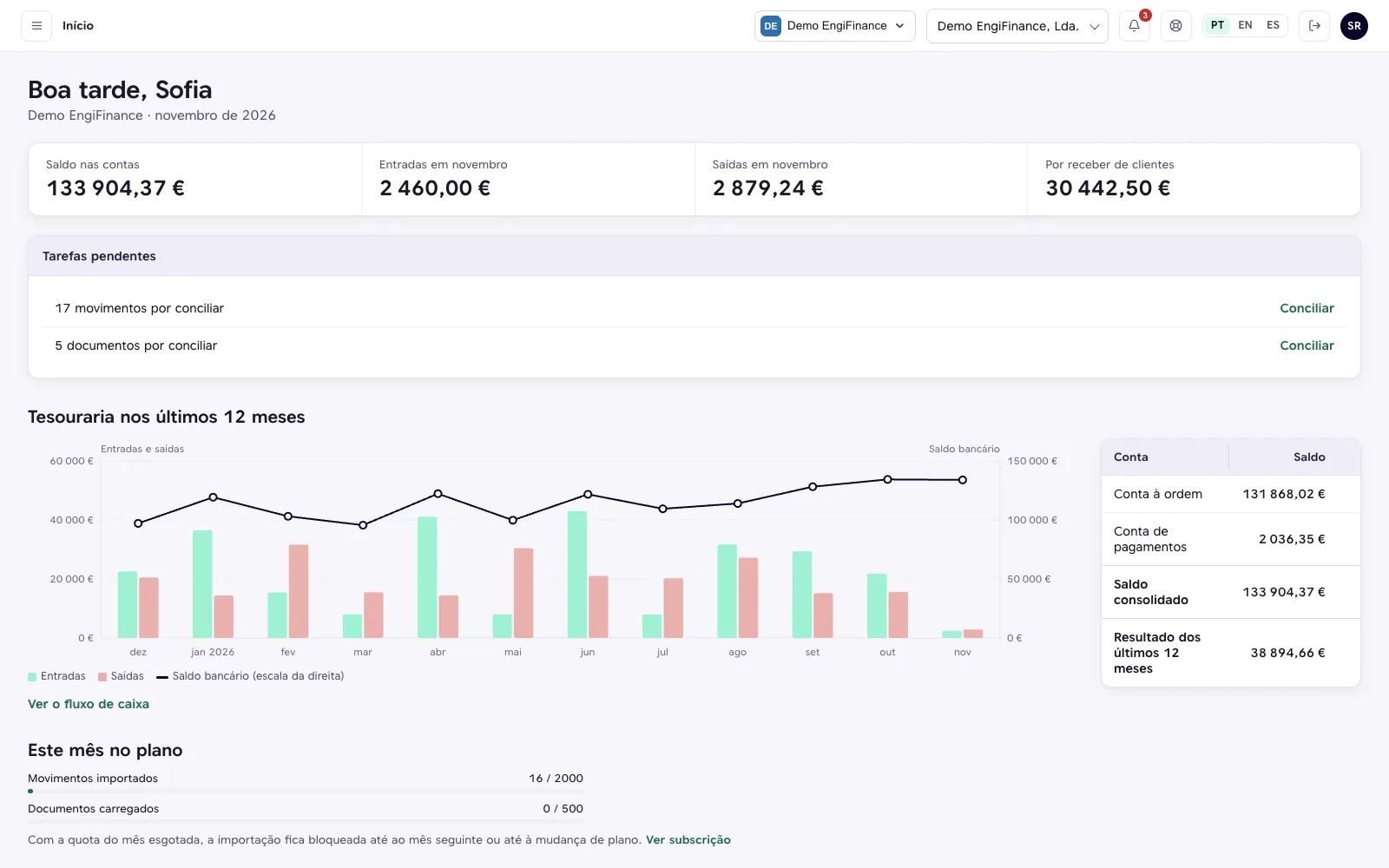
EngiFinance home, with the balance in the accounts, the month's inflows and outflows, the pending tasks, the last 12 months of treasury and the balance of each account.
Product screenshot, on demonstration data.
THE CHALLENGE

A monthly job spread across several tools

In many companies, statements are checked in several home banking sites, documents arrive by email, on paper and in PDF, and reconciliation is done in a spreadsheet.

Statements at several banks. Transactions from several accounts and banks are spread across online banking portals and spreadsheets.
Manual reconciliation. Invoices and receipts are matched by hand to the corresponding payments.
Month-end close. The accountant asks for the month's documents, and some are often missing.
Treasury overview. Knowing how much came in, how much went out, how much is still to be received and which customers the company depends on means gathering information from several sources.

EngiFinance brings these steps together in a single application.

HOW IT WORKS

From the statement to the month-end close, in five steps

No implementation project and no access to the bank accounts.

1
Statement import

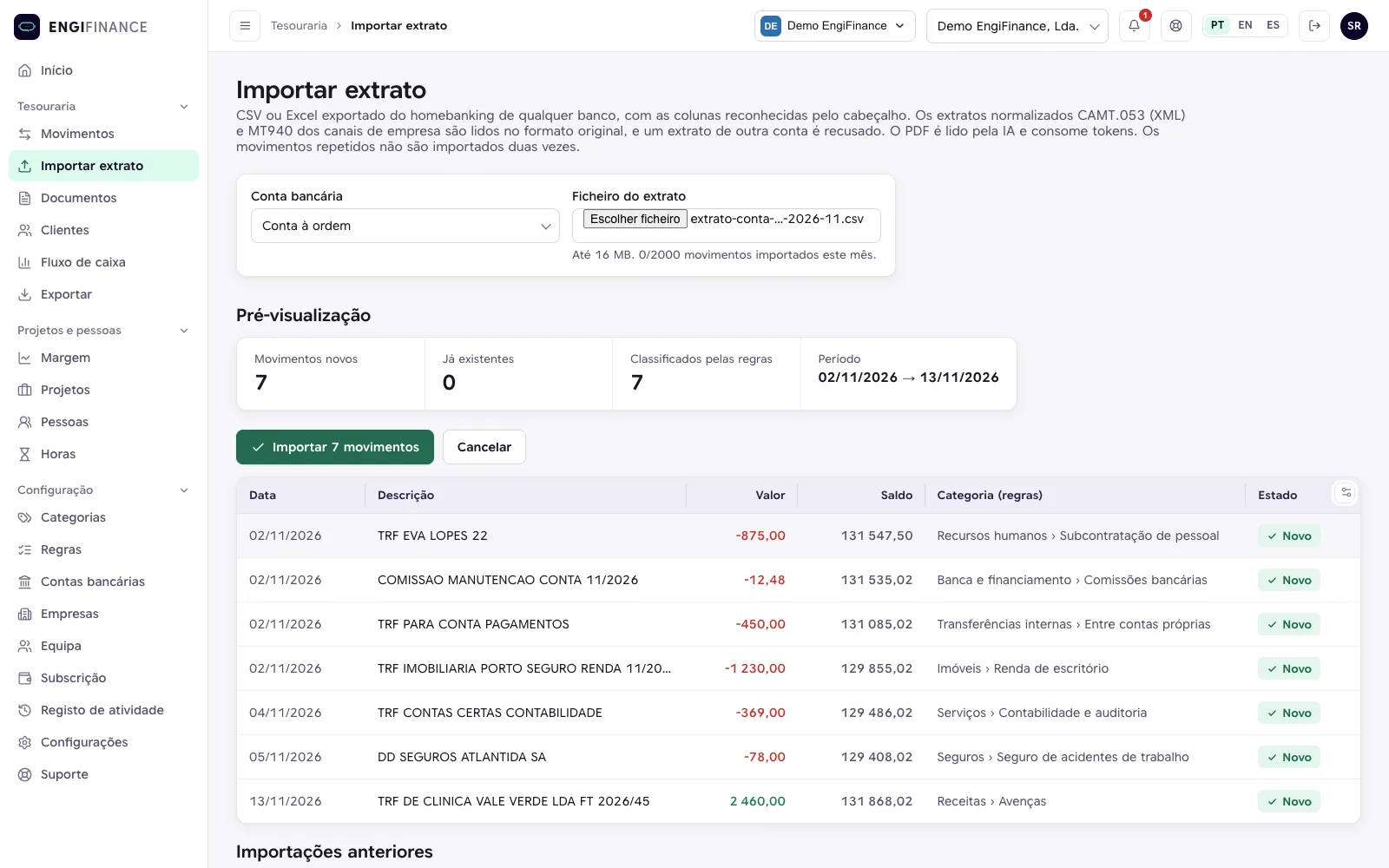
The statement of each account is imported in the format provided by the bank, with a preview before it is saved.

Import of a CSV statement, with the preview of the new transactions and the categories assigned by the rules.
Product screenshot, on demonstration data.
2
Transaction classification

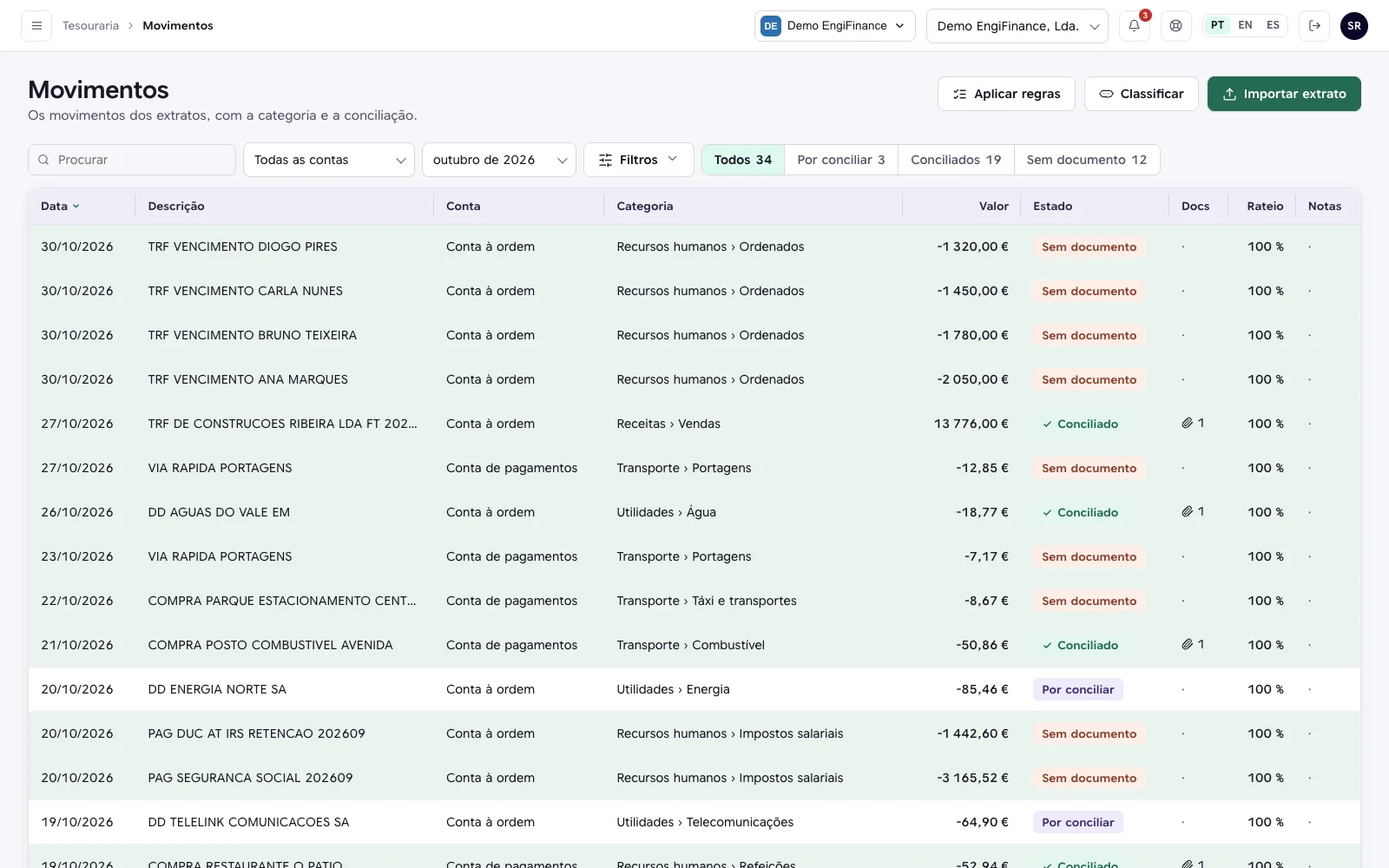
Recurring transactions are categorised by rules and the remaining ones by artificial intelligence. Manual corrections can be saved as a rule.

List of October's transactions, with the account, the category, the amount and the reconciliation status.
Product screenshot, on demonstration data.
3
Document upload

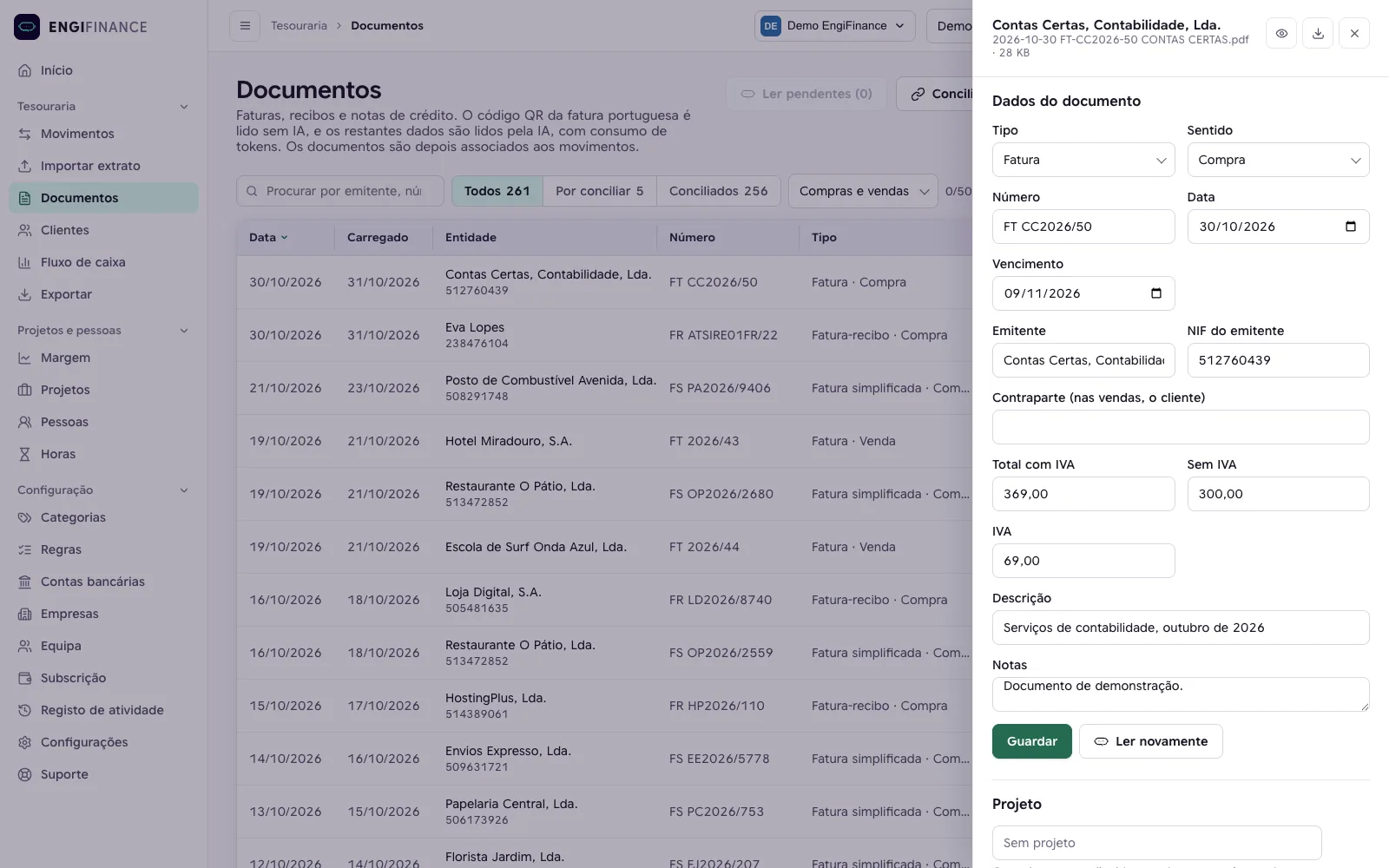
The month's documents are uploaded together. The QR code on Portuguese invoices is read directly and the other documents are read by artificial intelligence.

Drawer of a supplier invoice, with the number, the dates, the issuer, the tax number and the amounts read from the document.
Product screenshot, on demonstration data.
4
Reconciliation

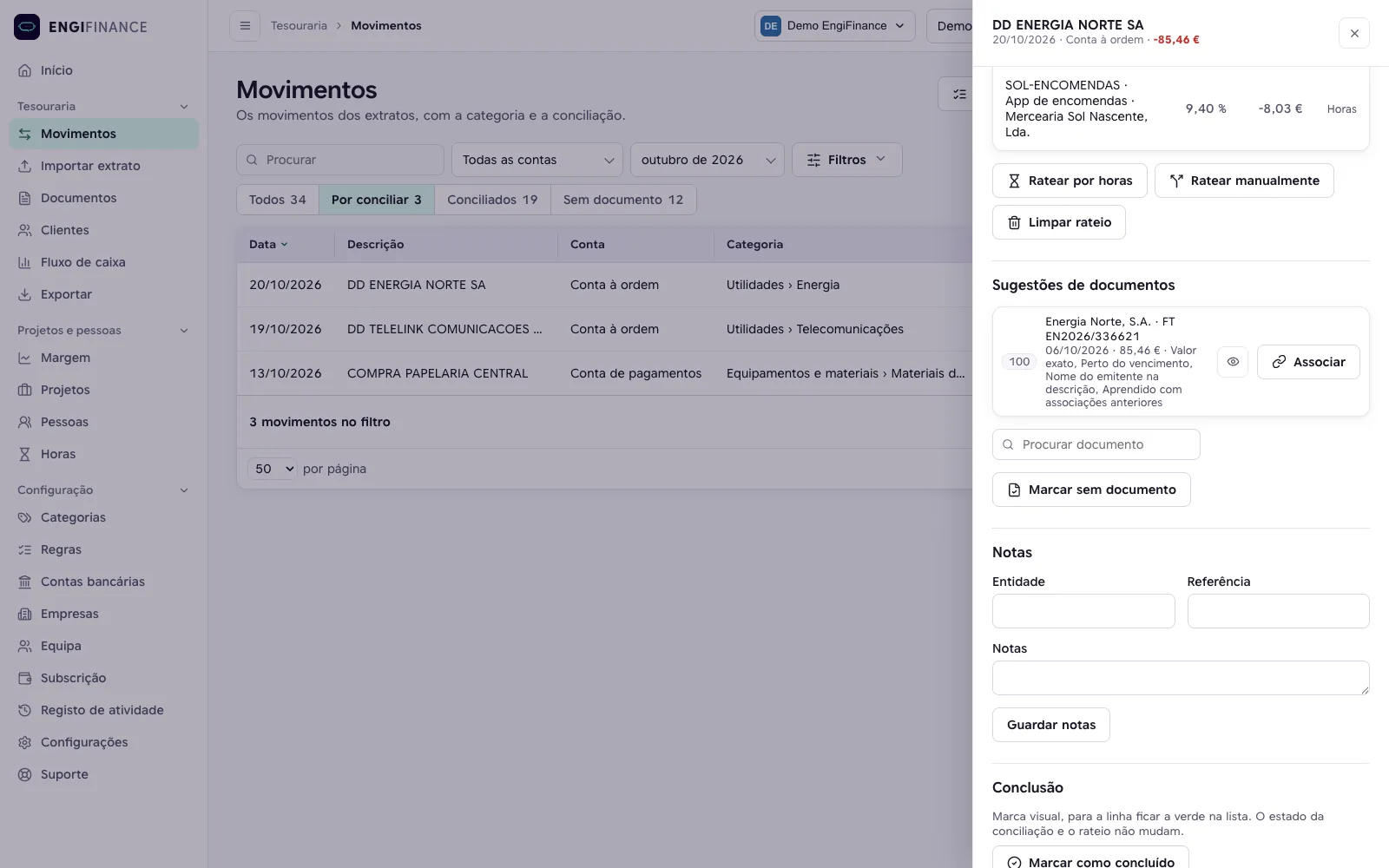
Unambiguous matches are reconciled automatically. The others appear as suggestions, accepted with one click.

Drawer of a transaction to reconcile, with the suggested document, the score and the reasons for the suggestion.
Product screenshot, on demonstration data.
5
Cash flow and export

The month's cash flow becomes available and the month is exported for the accountant in a single ZIP file.

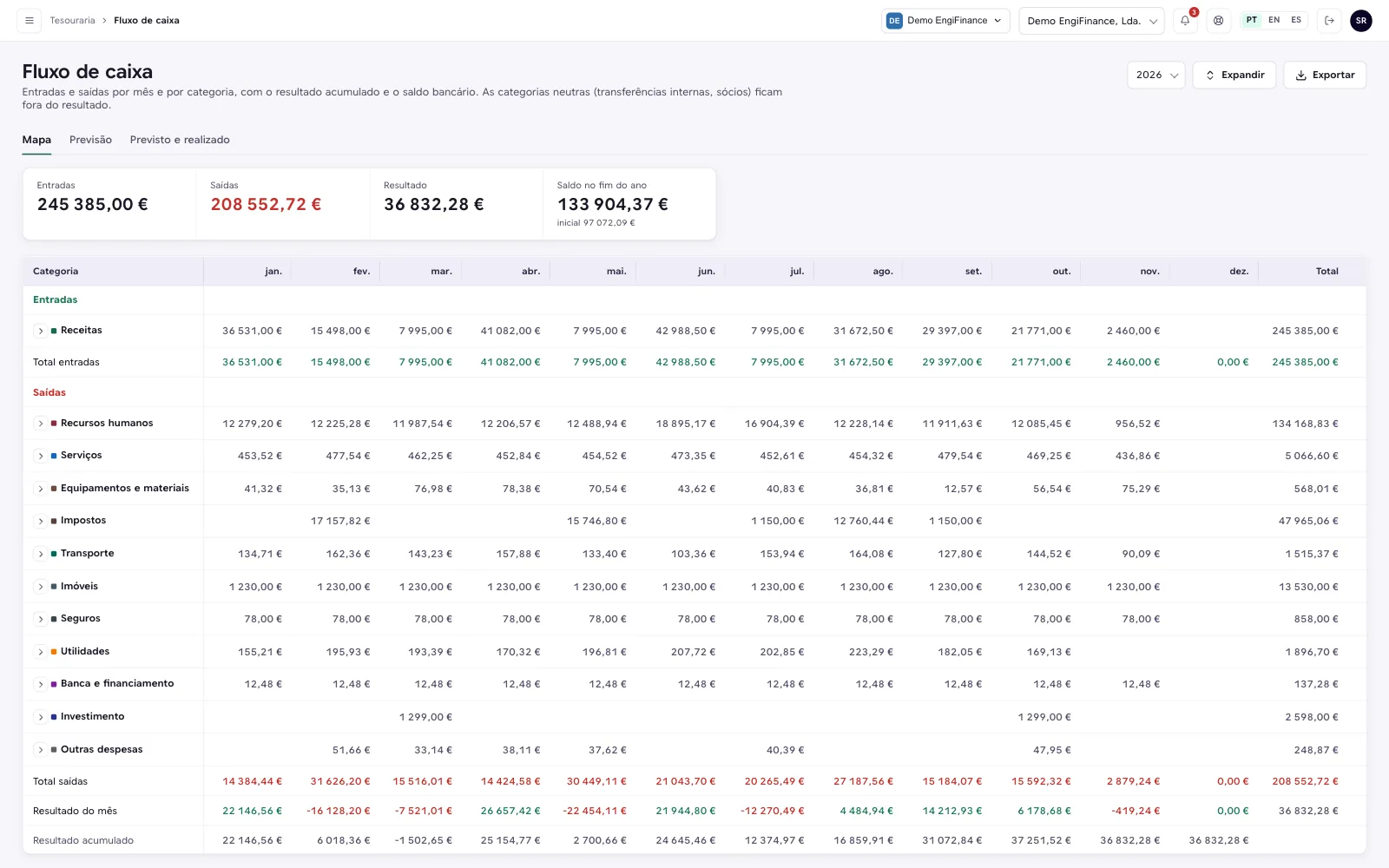
Cash flow map for 2026, with inflows and outflows by category and by month.
Product screenshot, on demonstration data.
WHAT IT DOES

Features by area

All areas work on the same data. The application works on the computer, the tablet and the phone, in English, Spanish and Portuguese.

Transactions and statements
  • ✓Import of statements in CSV, Excel (.xlsx), CAMT.053 and MT940, and reading of PDF statements by artificial intelligence
  • ✓Preview before saving, no duplication of transactions already imported, and cancellation of imports
  • ✓In the standard banking formats (CAMT.053 and MT940), files from another account or another currency are refused
  • ✓No access to the bank accounts, because statements are imported by file
Classification
  • ✓Two-level categories, with an optional accounting code, preconfigured and editable
  • ✓Rules with seven comparison types, priority, amount limits and direction, which can be tested before being applied
  • ✓When a transaction is corrected, the correction can be saved as a rule
  • ✓Batch categorisation by artificial intelligence of the transactions without a rule, applied only above the minimum confidence the organisation sets
  • ✓Each categorisation can be confirmed or corrected, and the correction can be saved as a rule
Documents
  • ✓Upload of up to 200 files at a time, in PDF, PNG or JPG, read in the background with a notice at the end
  • ✓The fields of the Portuguese tax authority's QR code are read without artificial intelligence and take precedence. The remaining fields are read by AI, and on documents without a QR code the AI reads the number, the dates, the tax numbers, the totals and the description
  • ✓Purchases and sales identified by the company's tax number
Reconciliation
  • ✓Reconciliation suggestions by amount, by date and by tax number, number or name in the bank description
  • ✓Automatic reconciliation only when the match is clear and has no close alternative, and each link can be undone
  • ✓Learning from the links made by the team, which ties the words in bank descriptions to each supplier or customer
  • ✓Partial payments and payments of several invoices, with the amount of each link
Treasury and cash flow
  • ✓Inflows and outflows of the last 12 months, consolidated balance and balance per account
  • ✓Monthly cash flow map by category, per year, with the balance at the end of each month and the transactions of each line
  • ✓12-month forecast of inflows, from invoices to be collected, and of outflows, from invoices to be paid, VAT and regular payments. Overdue amounts are kept apart, outside the forecast balance
Customers
  • ✓Revenue per customer, from the sales invoices, and each customer's share of the total
  • ✓Concentration of the customer base by the HHI index, in the low, moderate and high bands
  • ✓Outstanding and overdue balances, per customer
Projects Pro plan
  • ✓Billing plan per project, recurring (monthly, quarterly, half-yearly or yearly), by milestones or by hours
  • ✓To invoice and Recurring views, with what was contracted and what is still to be invoiced
  • ✓Sales invoices linked to the plan by suggestion, with the milestone invoiced by the invoice and collected by the reconciliation, and a notice of overdue milestones
  • ✓Billing plan included in the inflow forecast
  • ✓People costs, automatic or entered manually, monthly or hourly, and hours per project, entered manually or by file
  • ✓Cost allocation to projects, manual, by hours or in bulk for the month, with a report per project and per person
Integrations Pro plan
  • ✓API that lets other systems, such as the ERP or the accounting software, retrieve accounts, categories, transactions and documents
  • ✓Signed webhooks, which notify those systems when there are changes
WHO IT IS FOR

For management, finance and the accountant

An organisation can bring together several companies, and each person signs in with the role that corresponds to them.

Management and partners. They check the treasury, the cash flow and what is still to be received, without building spreadsheets.
Finance and administration. They import the statements, upload the documents and handle the reconciliation.
Accountant. Views and exports the information, without changing it.
Groups of companies. Each company in the group has its own accounts and documents, within the same organisation.
Service and project companies. On the Pro plan, they track what has been contracted, what is still to be invoiced and the cost of each project.
FOR THE ACCOUNTANT

Own access and monthly export

The accountant has a role of their own, with view and export access and no permission to change data.

  • ✓Export per month or per year, as a ZIP, with an Excel of the transactions, the documents and the cash flow, plus the period's documents and those linked to that period's transactions, renamed by date, issuer and number
  • ✓The accountant role does not count towards the user limit
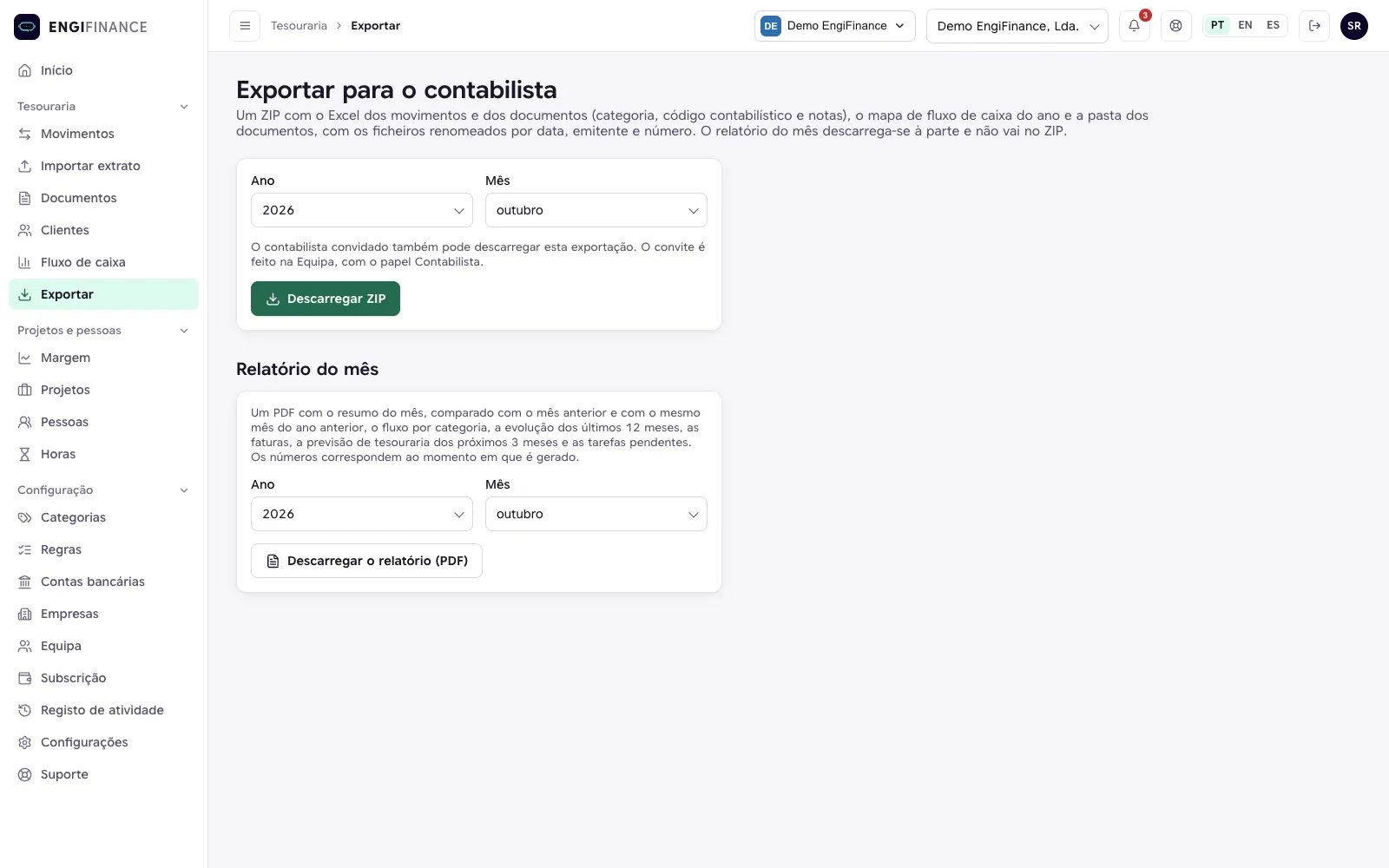
Export screen for the accountant, with the chosen year and month and the ZIP download button.
Product screenshot, on demonstration data.
  • movimentos.xlsx three sheets, with the transactions, the documents and the cash flow
  • documentos/ 26 PDF files
    • 2026-09-18-Demo-EngiFinance--Lda.-FT-2026-39.pdf
    • 2026-09-30-Contas-Certas--Contabilidade--Lda.-FT-CC2026-49.pdf
    • 2026-09-30-Eva-Lopes-FR-ATSIRE01FR-21.pdf
    • 2026-10-01-Demo-EngiFinance--Lda.-FT-2026-40.pdf
    • 2026-10-01-Demo-EngiFinance--Lda.-FT-2026-41.pdf
    • 2026-10-01-Demo-EngiFinance--Lda.-FT-2026-42.pdf
    • 2026-10-01-Seguros-Atlântida--S.A.-RC-2026-90760.pdf
    • 2026-10-06-Energia-Norte--S.A.-FT-EN2026-336621.pdf
    • and 18 more documents, renamed the same way
Contents of the exported ZIP, on demonstration data.
WHAT SETS IT APART

Built from Engibots' own financial management

EngiFinance is the online version of the internal tool Engibots uses for its own financial management, and it runs today on the company's real data.

Rules before artificial intelligence

Recurring transactions are handled by rules. Artificial intelligence is used only on the remaining ones, and each result can be confirmed or corrected.

Portuguese invoices

The Portuguese tax authority's QR code is read directly, without artificial intelligence, and whether it is a purchase or a sale is determined by the company's tax number.

Reconciliation that learns

The system learns from the links made by the team and comes to recognise, in bank descriptions, the words of each supplier or customer. In an internal measurement on 23 September 2026 over Engibots' own history, automatic reconciliation made 325 links, all correct, and handled 62% of the one invoice to one payment pairs. The rest were left as suggestions.

SCOPE

What EngiFinance does not do

EngiFinance handles treasury and reconciliation. The following points are outside its scope.

  • ✕Issuing invoices. EngiFinance is not invoicing software. It reads the sales invoices issued in the software the company already uses.
  • ✕Direct connection to banks (open banking). Statements are imported by file, as a product choice.
SECURITY AND DATA

Security and access control

No bank credentials

Statements are imported by file, and the company does not share access to its accounts.

Isolation per organisation

Each organisation's data is isolated in two layers, in the application and in the database.

Two-factor authentication

The organisation can make it mandatory for all users.

Roles and activity log

Three roles (administrator, member and accountant), and the organisation's activity log for administrators.

PRICING

One price per organisation, with no per-user seats

The price is per organisation, and the tiers are by volume of transactions and documents. The accountant does not count as a user.

Starter
8,33 €10 €+ VAT per month, per organisation, billed annually+ VAT per month, per organisation, billed monthly
  • ✓1 company
  • ✓150 transactions and 30 documents per month
  • ✓2 users
  • ✓Transactions and statements, documents, reconciliation, cash flow and export
The 15-day trial uses this plan
Business
20,83 €25 €+ VAT per month, per organisation, billed annually+ VAT per month, per organisation, billed monthly
  • ✓3 companies
  • ✓500 transactions and 150 documents per month
  • ✓5 users
  • ✓Transactions and statements, documents, reconciliation, cash flow and export
Pro
41,67 €50 €+ VAT per month, per organisation, billed annually+ VAT per month, per organisation, billed monthly
  • ✓10 companies
  • ✓2,000 transactions and 500 documents per month
  • ✓Unlimited users
  • ✓Everything in the other plans, plus projects, cost allocation, API and webhooks

15-day trial, with the limits of the Business plan and no card. Reading PDF statements and documents without a QR code by artificial intelligence, and categorising transactions by AI, consume AI tokens, counted against a monthly quota included in each plan. When a monthly quota runs out, imports are suspended until the following month, at no extra cost.

FAQ

Frequently asked questions

EngiFinance does not depend on an integration with the bank. Statements are imported by file, in CSV, Excel, CAMT.053 or MT940, and PDF statements are read by artificial intelligence. There is no need to give access to the bank accounts.

Invoices and receipts in PDF, PNG or JPG, up to 200 files at a time. The Portuguese tax authority's QR code is read directly. On documents without a QR code, artificial intelligence reads the number, the dates, the tax numbers, the totals and the description.

In reading PDF statements, in reading documents without a QR code and in categorising the transactions the rules do not handle. Each categorisation can be confirmed or corrected, and the correction can be saved as a rule.

No. It reads the sales invoices issued in the invoicing software the company already uses.

EngiAIFlow automates processes in the company's systems, including bank reconciliation connected to the ERP, and is implemented to measure. EngiFinance is a ready-to-use application, with no implementation, in which the company's team imports the statements, reconciles and exports the month for the accountant. Engi360 handles operational management, from hours to pre-invoicing, and EngiFinance handles treasury, from statements to reconciliation and cash flow.

English, Spanish and Portuguese, on the computer, the tablet and the phone.

No. The accountant role does not count towards the user limit.

Imports are suspended until the following month, at no extra cost.

In a 20-minute meeting, we show EngiFinance live, in an organisation with demonstration data.

EngiFinance demonstration

In a 20-minute meeting, we show a full month in EngiFinance, from importing the statement to exporting for the accountant, in an organisation with demonstration data.