Every decision justified
Each decision shows what has been confirmed and what is still to be confirmed, such as the sender's domain or the tax number. No conclusion appears without a justification.
Engibots' platform, designed around each operation and built to evolve with it. Its artificial intelligence agents handle what is clear on their own, ask the team when in doubt and learn from the team's decisions. They never execute anything beyond what was configured.
EngiAIFlow · Intelligent Process Automation
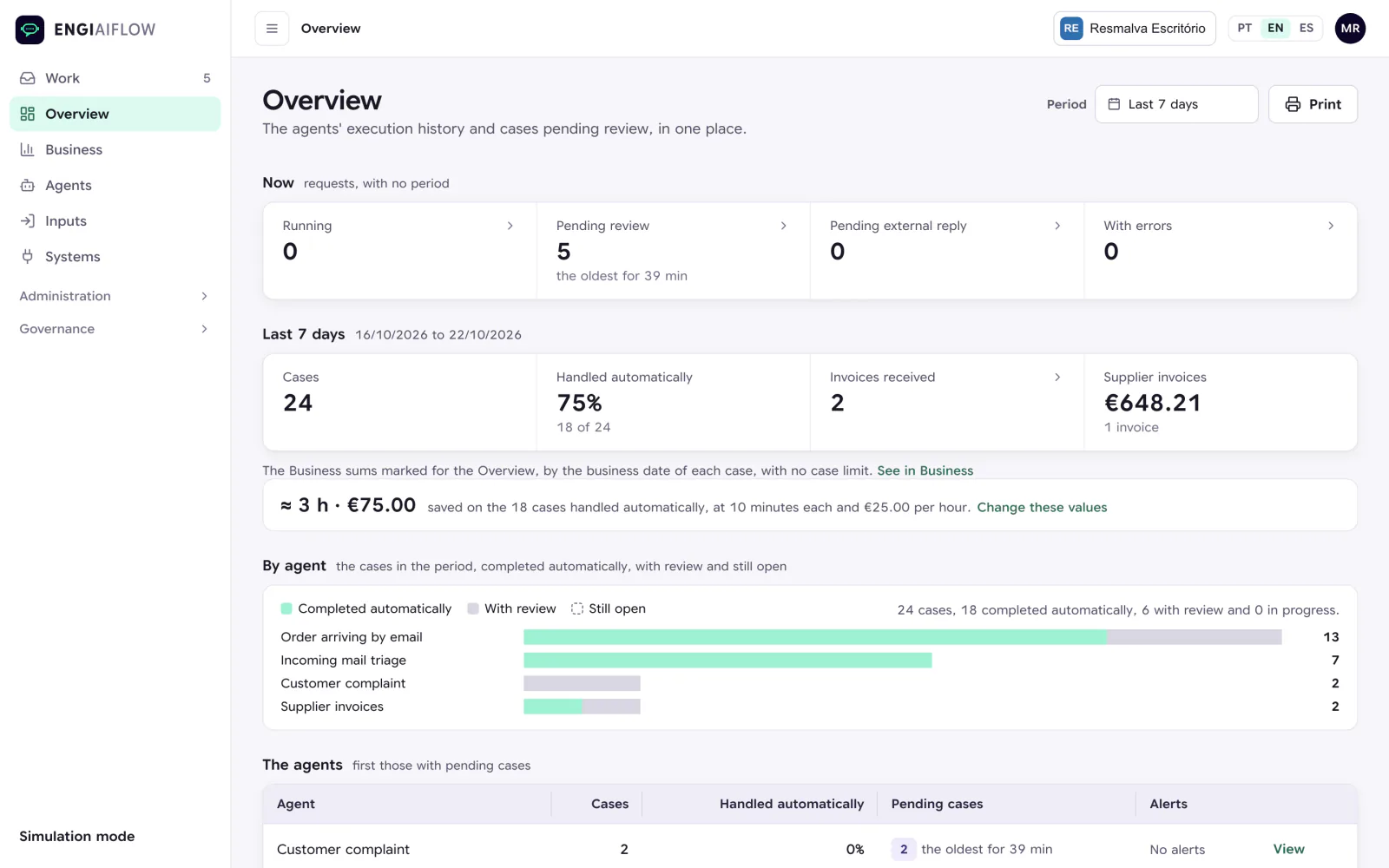
It brings together the experience of more than 50 processes in production in Portugal, Spain, Italy and Belgium, with a return on investment in under 12 months and up to 80% less manual work.
An order that arrives by email and goes all the way to the ERP on its own, a case where the ERP refuses and the team decides, supplier invoices matched against the order and the goods received, and the configuration and audit trail.
Recorded in EngiAIFlow with demonstration data. No narration.
EngiAIFlow orchestrates people, processes and systems. In each process, an artificial intelligence agent interprets what comes in and proposes the next step, within the rules set by the team, and the platform executes in the company's systems.
Much of back-office work is reading, copying and checking. Requests, invoices and statements pass through the same hands every day, and the time is spent on tasks that did not require a decision.
With EngiAIFlow, clear requests go on their own from receipt to the reply to the customer. The team only receives the cases that require a decision, already prepared.
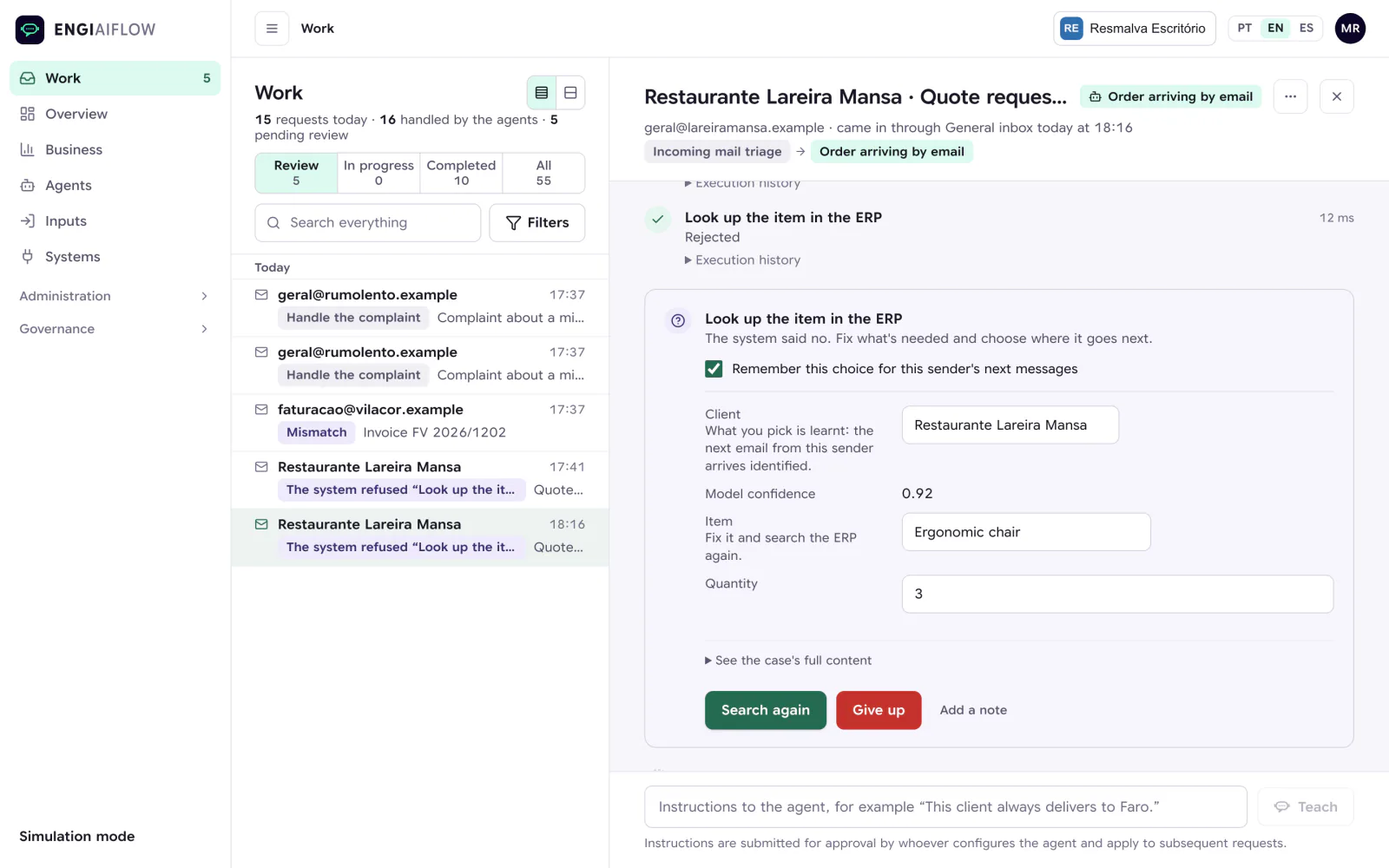
Each decision shows what has been confirmed and what is still to be confirmed, such as the sender's domain or the tax number. No conclusion appears without a justification.
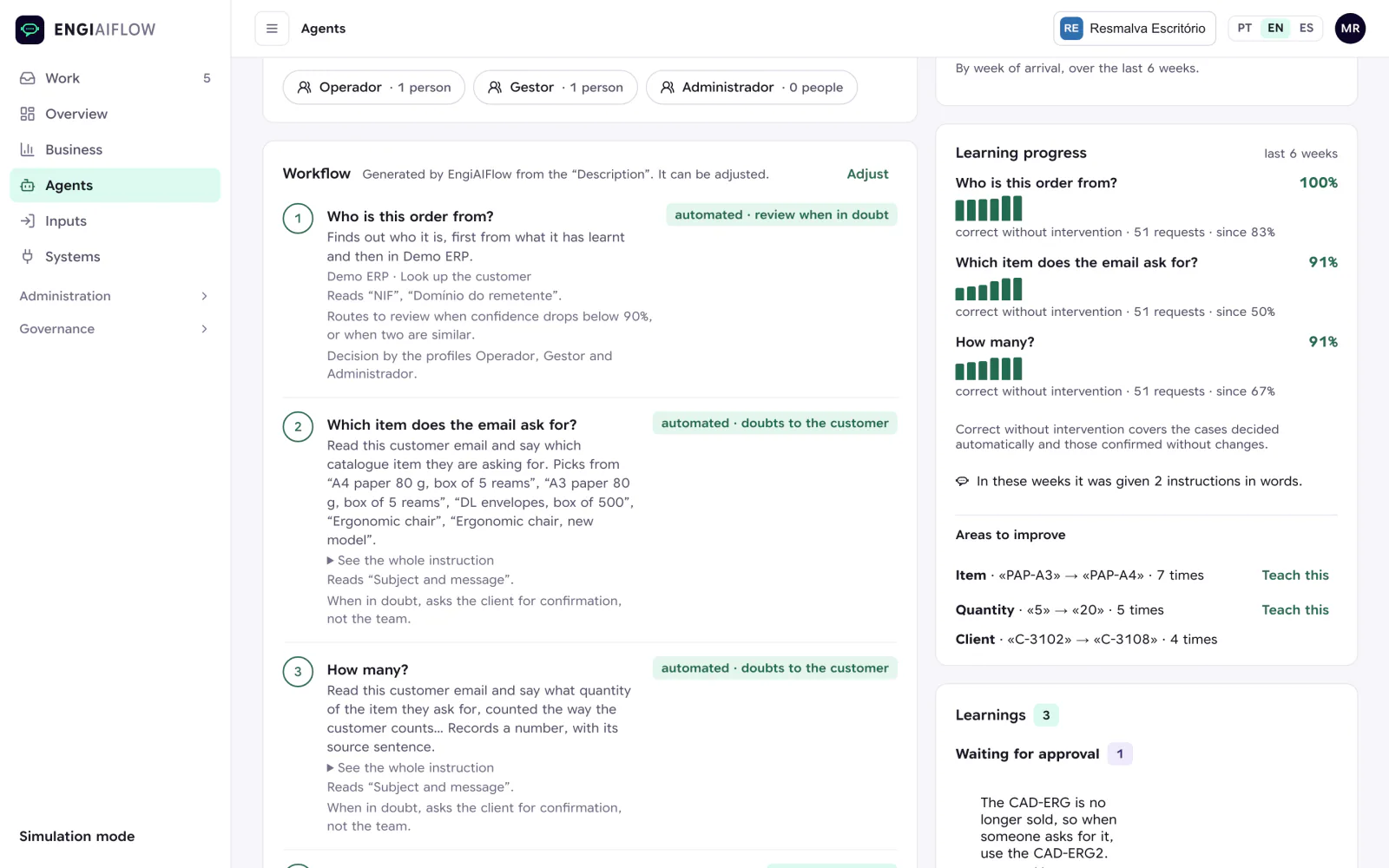
There are three levels, Apprentice, Supervised and Autonomous, and an agent described in words starts as Apprentice. The team raises the level at its own pace, and rules are written in plain language, such as “before replying to the customer, ask for approval”.
What the team confirms is recorded, and each learned item can be reviewed and switched off. When the team links a sender to a customer, later messages from that sender arrive already identified.
It automates the whole flow, including the steps that cut across several systems. Not isolated tasks automated one by one, but the process handled from start to finish.
A common foundation, with each process designed around the operation and handled by an agent.
In a shared inbox, someone has to read every message to decide who handles it.
Orders arrive by email and are typed into the ERP manually.
Complaints are scattered across mailboxes and people, and some go unanswered.
The bank statement is checked against the invoices manually, line by line.
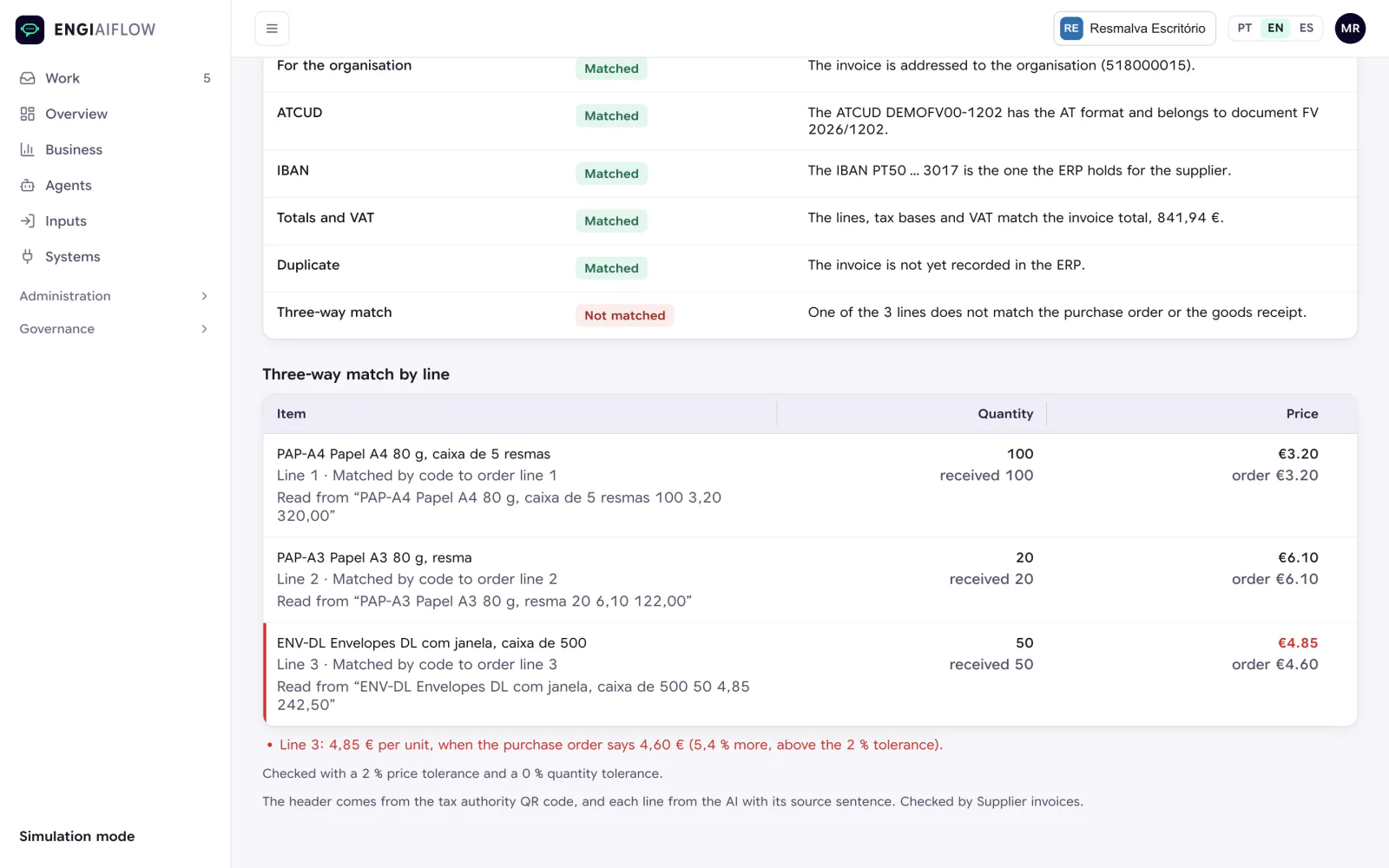
Every supplier invoice is checked manually against the order and the goods received.
Booking a delivery, an installation or a technical visit takes several rounds of emails and phone calls.
There are daily tasks in portals and applications with no integration available.
Every company has its own processes, which no off-the-shelf product covers.
Collections, direct debits, credit notes, approvals, digital signature, quotes and prospecting are automated on the same foundation, as described in Solutions.
A request or a document arrives by email, WhatsApp, Teams or the API, the process starts at a scheduled time, or an intelligent RPA fetches it from a portal or an application.
It interprets the request with artificial intelligence, applies the company's rules and marks in the document the sentence each value came from.
The platform records the result in the ERP or another company system and replies to the customer through the same channel.
When in doubt, the case reaches a person with what has already been done and the decision still to be made.
The team's corrections guide the cases that follow.
What was handled on its own and what went to a person can be reviewed at any time.
EngiAIFlow separates what artificial intelligence reads from what the platform executes. What runs, what goes to a person and what is recorded is decided by the platform, according to what the team has configured.
It connects to the ERP, email and the other tools, without replacing systems and with the control that operations demand.
It receives requests from IMAP and Microsoft 365 mailboxes, WhatsApp Business, Microsoft Teams, other systems through the API, and scheduled tasks.
EngiAIFlow connects to the ERP, the CRM, banking platforms, cloud repositories and the spreadsheets the operation already uses. It looks up data such as customers, items or stock, and writes to the source systems, which allows the process to be closed without manual intervention. Where there is no API, intelligent RPAs work directly on the systems' interfaces. Actions are configured system by system.
It reads PDF attachments and, when enabled, scanned documents. Each user works in Portuguese, English or Spanish.
Three predefined profiles, Operator, Manager and Administrator, plus the installation's own profiles, created with “Duplicate” and with permissions set one by one, in a grid. The installation settings, accounts, profiles, keys, robots and deleting cases are separate permissions. Changing an account's profile takes effect on its next request, and deleting a case or changing a profile is recorded in the audit log, in the name of whoever did it. Fields declared sensitive are masked in the case history.
In an installation running in demonstration mode, with a simulated ERP, processes are tried out with sample emails and documents, with no effect on live systems.
Each company has its own installation. The artificial intelligence model can run locally, so that requests never leave the company, or on Azure OpenAI.
The artificial intelligence models operate under a no-retention policy for training data, and the company's information is used to run the process and not to improve third-party models. EngiAIFlow works on the data that already exists in the systems, with no migration or duplication of databases. Data is encrypted at rest and in transit, and the implementation follows the applicable European regulatory framework, including the GDPR and the EU AI Act.
In a 20-minute meeting, we show you a process similar to yours, live, and point out what can run on its own and what should stay in people's hands.
Book 20 minutes